TimeClock Plus Clock
- 4.9
- Rating
- 100.00K
- Installs
- Free
- Price

 Analysis by App-foxy
Keeping track of working time sounds simple until a team has several people starting shifts in different places, switching tasks during the day, or trying to remember hours at the end of a busy week. I have found that the real problem is rarely the arithmetic. It is the scattered process around it: messages, paper notes, memory, and last-minute corrections. TimeClock Plus Clock is designed to bring that routine into one mobile time-tracking workflow, and that focus makes it more useful than a general-purpose timer for the right kind of team.
This is a business app from TimeClock Plus, LLC, available free of charge for everyone. It has reached more than one hundred thousand installs and holds a 4.9 average from roughly four thousand six hundred ratings, which suggests that its straightforward purpose is resonating with many users. I would not choose it simply because of those figures, though. The more important question is whether your workplace needs a shared, repeatable way to record attendance and working time rather than another personal productivity tool.
From scattered time notes to a dependable work routine
I look at time tracking less as a matter of counting minutes and more as a matter of building a routine people can follow even on a hectic day. That distinction matters for mobile teams, where a clear clock-in habit can prevent a pile of notes and follow-up messages. The next section considers how that routine holds up in ordinary work, including the moments when it is easiest to forget.
You May Also Like

 Blood Strike: 2.5 Anniversary
Blood Strike’s Loadouts Turn Every Drop Into a Tactical Gamble
A close look at Blood Strike’s custom loadouts: how fast access to signature weapons reshapes its battle royale rhythm, rewards preparation, and narrows the gap between fights.

 Pandora - Music & Podcasts
Pandora’s Music Is Easy to Start, but Harder to Recover
Pandora’s strength is its low-effort path from a seed to a station. Its weak spot is how much confidence it asks you to place in connection, setup, and quiet recovery.

 8 Ball Pool
8 Ball Pool Is Built on Rivalries, Rematches, and Routine
A close look at the rivalries, rematches, shared routines, and unanswered safety questions that turn a quick pool match into a persistent mobile community.

 Samsung Music
Samsung Music’s Quiet Strength Is Playing What You Already Own
Its reach comes less from spectacle than from dependable access to a personal library. That simplicity is both the app’s strongest retention engine and its ceiling.

 AccuWeather: Weather Radar
AccuWeather Review: A Quick, Clear Forecast for Everyday Decisions
For everyday plans, the best forecast is the one you can understand quickly. AccuWeather makes rain timing, radar, and local conditions easy to act on, with a few trade-offs.

 Hill Climb Racing
Why Hill Climb Racing Still Turns Crashes Into One More Run
A tiny car, a bumpy hill and one more upgrade: Hill Climb Racing keeps resurfacing because its simple chaos makes every near-miss feel personal.
More From Our News Desk



What the workflow looks like before using it
Before a dedicated clocking app, a small team often relies on a mixture of habits. One employee writes a start time in a notebook, another sends a message to a supervisor, and someone else tries to reconstruct a shift from memory. That approach can survive when everyone works in the same room and the schedule barely changes. It becomes fragile when people are on the move or when a manager needs a consistent record.
My first useful insight with this kind of tool is that the app should not be treated as a passive stopwatch. It works best as the visible starting point and ending point of a workday. The team agrees on when clocking happens, employees use the same process each time, and supervisors have a clearer record to work from. That small change removes several decisions from the day, which is often more valuable than adding another screen full of options.
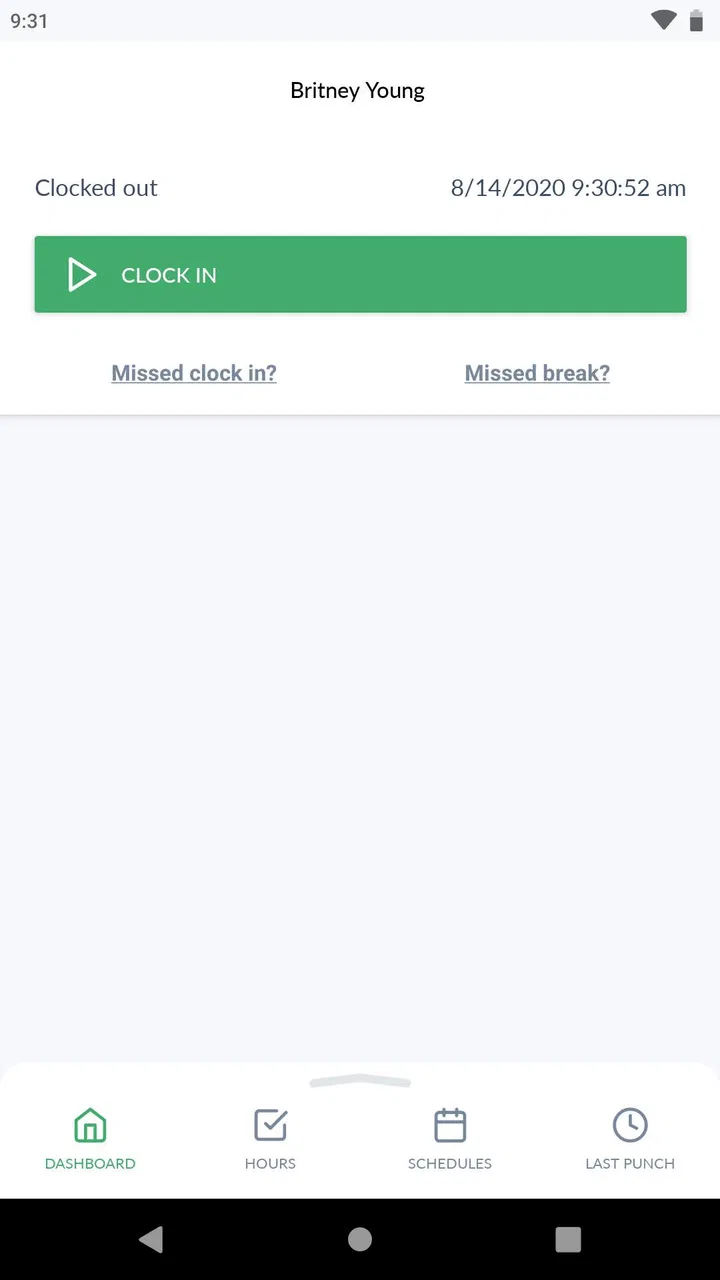
TimeClock Plus Clock is especially well suited to teams that need mobile access while working away from a desk. A field worker, delivery employee, service technician, or staff member moving between locations can use a phone as the practical entry point for time tracking. The app’s store summary describes easy, accurate time tracking for teams on the go, and that is the right way to understand its role: it is built around attendance capture, not elaborate personal time management.
There is also a useful distinction between recording time and managing work. This app can help establish when someone worked, but it should not be expected to replace a project planner, communication platform, payroll process, or detailed task-management system. I would pair it with those tools rather than asking it to become all of them at once. A clean boundary makes the routine easier for employees and reduces confusion for whoever reviews the records.
Capturing time without creating another administrative chore
The strongest reason to adopt a mobile clock is consistency. When every employee records time through the same channel, a manager does not have to interpret several personal systems. That matters even more for hourly teams, where a missed entry can create a correction request and a chain of follow-up messages.
In an everyday scenario, imagine a maintenance team that begins the morning at different customer sites. Without a shared process, the supervisor may receive separate texts with approximate start times and then ask for clarification later. With TimeClock Plus Clock in the routine, each person can make the clocking action part of arriving at work. At the end of the day, the same action becomes part of leaving. The benefit is not dramatic in one moment; it is the reduction of small ambiguities across many workdays.
I recommend setting a simple rule before deployment: clock in immediately before beginning paid work, clock out when the work period ends, and report mistakes as soon as they are noticed. This sounds obvious, but it prevents the app from becoming a place where people reconstruct an entire week from memory. The tool is only as accurate as the habit surrounding it.
A less obvious advantage is that a shared mobile workflow can expose where the process itself is weak. If employees regularly forget to clock out, the issue may not be carelessness. They may be moving directly from a job to a commute, losing connectivity, or treating the end of a shift as an informal moment. Reviewing those patterns can lead to a better reminder or handoff process, even when the app itself is not the cause.
Organizing the day around a repeatable routine
I would introduce the app in stages rather than asking a whole team to change everything overnight. First, explain what counts as the start and end of a work period. Next, have employees use the same clocking routine for several shifts. Finally, make corrections part of a regular review instead of an emergency conversation at the end of a pay period.
This approach turns time tracking into a sustainable productivity system. The app handles the capture point, while the team supplies the rules and review rhythm. A supervisor might check entries at a predictable time each day, while employees learn to look at their own records before moving on from a shift. That separation is important: the person doing the work owns the immediate action, and the manager owns the process that keeps errors from accumulating.
For a small business, I would keep the onboarding explanation short and practical. Show the employee when to use the clock, what to do after a missed entry, and whom to contact when something looks wrong. Avoid presenting the app as a complicated compliance project. People are more likely to use a time clock correctly when the instruction is tied to a familiar event, such as arriving at the first assignment or finishing the last task.
Another useful habit is to avoid mixing time capture with personal task timing. If an employee starts and stops the clock every time they change activities, the record may become noisy and difficult to interpret. The better routine is usually to record the work period according to the organization’s policy and use a separate system for detailed task estimates. TimeClock Plus Clock has more value when it remains a dependable attendance record instead of becoming an improvised project tracker.
The current version is 1.43.0, and the app supports devices running Android 7.0 or later. That makes it accessible to teams using a range of older Android phones, although I would still test it on the exact devices employees carry before a broad rollout. A minimum operating-system requirement is only one part of real-world compatibility. Screen size, battery condition, connectivity, and the employee’s comfort with mobile workflows can matter just as much.
Where the process can fail
No time clock can remove every source of friction. A phone may be unavailable, a worker may forget the action, or a shift may change unexpectedly. The key question is whether the organization has a sensible recovery path. If there is no agreed method for correcting a missed clocking event, a digital record can still turn into a manual investigation.
Mobile use also creates a practical trade-off. It is convenient for people who work away from a fixed station, but it depends on employees treating their phones as part of the work routine. Some teams may prefer a shared terminal or a desktop-based system because it keeps clocking in one controlled place. If your workplace has a stable entrance and everyone passes through it, a dedicated physical setup may feel clearer than asking each person to use a personal device.
Another limitation is scope. I would not select this app as the main tool for a team that needs extensive project budgeting, deep scheduling, invoicing, or a full employee-management suite. A specialized workforce platform may be a better choice when time entries must connect directly to complex payroll and operations workflows. TimeClock Plus Clock makes more sense when the immediate need is reliable mobile time capture and the surrounding business systems already exist.
There is also a human issue that is easy to overlook. Employees may worry that a time clock is being used to monitor every movement rather than to record working hours. The best response is transparency: explain what the organization expects the app to record, how corrections are handled, and why consistent entries help both staff and management. Trust is not created by the interface. It comes from the policy around it.
I would also plan for the occasional forgotten entry without turning it into a disciplinary event by default. A correction log, a clear contact person, and a quick daily review are more sustainable than forcing managers to search through old conversations. This is one of the app’s important trade-offs: it can centralize the record, but the company still needs a fair method for resolving exceptions.
What I would check before asking a team to adopt it
Before recommending it to a workplace, I would ask four practical questions. Do employees regularly work away from a desk? Is the main problem inconsistent clocking rather than complex workforce planning? Can the organization teach one simple routine? And is there already a person responsible for reviewing corrections? If the answers are mostly yes, the app has a clear job to do.
I would also run a small trial with different working patterns. Include someone who begins at a fixed location, someone who travels between assignments, and someone who occasionally changes shifts. The goal is not merely to see whether the app opens. It is to discover where the routine breaks: at arrival, during transitions, at the end of the day, or when an entry needs attention.
One non-obvious test is to observe what happens during a rushed departure. Most systems look fine when people have time to follow instructions. The stressful moment at the end of a shift reveals whether the process is memorable enough. If employees consistently skip the final action, adjust the surrounding routine instead of assuming another feature will solve it.
Another useful check is to compare the app with the alternative your team actually uses, not with an idealized competitor. If the current option is paper, chat messages, or a spreadsheet, the mobile clock may provide a meaningful improvement in consistency. If the current option is already a mature workforce-management platform with scheduling and payroll connections, switching may add little unless mobile simplicity is the main gap.
The app’s Everyone content rating and free price also lower the barrier for evaluation. That does not mean adoption is costless. Training time, policy decisions, device support, and review responsibilities still matter. I see the free availability as a reason to test the workflow, not as proof that every organization should replace its existing system.
Who will get the most from it
I would recommend TimeClock Plus Clock to small and mid-sized teams that need a clear mobile method for recording work time. It is a particularly sensible fit for employees who are frequently away from a shared office, provided the company is ready to define a consistent clocking policy. The app also suits managers who want to reduce scattered time notes without introducing a large, complicated platform.
It may be a good first step for a business moving away from paper records. In that situation, the main gain comes from making the behavior repeatable. Employees do not need to learn a complete operations suite just to record the beginning and end of a shift. Managers can focus on reviewing exceptions instead of deciphering handwriting or chasing separate messages.
I would be more cautious for freelancers and solo workers. A personal timer or calendar may be better if the goal is billing by project, measuring focused work, or analyzing how long individual tasks take. This app’s value is strongest when several people need a common attendance workflow. A lone user may find that a lighter tool matches the problem more closely.
I would also look elsewhere if your organization needs a highly customized scheduling environment or extensive reporting tied to many business processes. A dedicated enterprise platform may justify its added complexity in that case. The convenience of a focused app becomes a limitation when the team expects it to manage every part of workforce administration.
My overall recommendation
After looking at it as part of a complete work routine, I see TimeClock Plus Clock as a practical tool for making mobile time capture more consistent. Its best quality is not that it promises to transform productivity. It gives a team one clear moment to record working time, then supports a routine that can be reviewed and corrected before small errors become larger problems.
The app is free, aimed at a general audience, and developed by TimeClock Plus, LLC. Its strong 4.9 average and broad install base make it worth considering, but my recommendation depends more on fit than popularity. If your team is replacing paper, messages, or scattered spreadsheets, this focused approach could make everyday administration noticeably calmer.
I would adopt it with a short written policy, a small trial, and an agreed correction process. I would not present it as a substitute for scheduling, payroll, or project management, and I would not force it onto a team whose work is already well served by a fixed terminal or a more comprehensive platform. Used within the right boundaries, though, it can turn time tracking from a weekly reconstruction exercise into a small, dependable part of the workday.
My advice is simple: choose it when your main need is shared mobile attendance capture, and skip it when your real need is detailed workforce planning or project accounting. That distinction is what makes the app either a useful daily habit or an unnecessary extra layer.
FAQs for TimeClock Plus Clock
01What is TimeClock Plus Clock used for?
TimeClock Plus Clock is a workforce time-tracking app designed to let employees clock in and out, review their work hours, and manage attendance from a mobile device. Depending on the organization’s setup, it may also support breaks, job or department selection, location verification, timesheet review, and notifications. The exact tools available can vary according to the employer’s TimeClock Plus configuration.
02Do I need an employer account to use TimeClock Plus Clock?
Yes, this app is generally intended for employees whose organization uses TimeClock Plus for workforce management. Installing the application alone usually is not enough to begin recording time. You may need company-provided login details, an organization code, or an invitation from an administrator. If you cannot sign in, your employer’s payroll or HR administrator is normally the correct person to contact.
03Can I clock in and out from anywhere with the app?
Not necessarily. Whether you can clock in remotely depends on the rules configured by your employer. Some organizations allow mobile clock-ins, while others restrict them to approved locations, devices, Wi-Fi networks, geofenced areas, or scheduled workplaces. The app may also request location permissions or other device access for verification. Always check your company’s attendance policy before relying on mobile clocking.
04Does TimeClock Plus Clock require location access or other permissions?
The permissions required can depend on how your organization uses the service. Location access may be requested to confirm that a clock-in occurs at an approved workplace, while notifications can help with schedule or timesheet reminders. Camera, Bluetooth, or other permissions may be relevant in specific company configurations. Review each permission request carefully, and ask your employer how collected information is used.
05What should I do if my clock-in, timesheet, or hours are incorrect?
First, check whether the app shows a pending synchronization, connection problem, or an incomplete clocking event. If the information still looks wrong, avoid repeatedly submitting entries, since this could create duplicates. Use any available correction or note feature, then contact your supervisor, payroll team, or TimeClock Plus administrator according to company policy. Only authorized administrators may be able to edit approved time records.
Pros
- Simple clock-in and clock-out process for everyday shifts.
- Supports location-based attendance verification where enabled.
- Clear timesheet access helps users review recorded hours.
- Useful for employees working across multiple locations.
- Can reduce paperwork for managers and payroll teams.
Cons
- Some features may require employer-administered account permissions.
- Location tracking can raise privacy concerns for some employees.
- App usefulness is limited without an organization using TimeClock Plus.
- Clock-ins may fail with weak internet or restricted device permissions.
- Users may need to contact their employer to fix time-entry errors.

TimeClock Plus Clock
Gallery